![Group 1261151152.png]](https://support.warmy.io/hs-fs/hubfs/Group%201261151152.png?width=50&height=50&name=Group%201261151152.png)
SPF Configuration
SPF (Sender Policy Framework) allows specific servers to send emails on behalf of your domain.
Warmy requires you to add the following SPF mechanism to authorize its sending servers:
include:mail.warmbee.co
By adding this entry, you allow Warmy’s mail servers to send emails using your domain.
Scenario 1 - You Already Have an SPF Record
If your domain already has an SPF record, you must add the Warmy entry to the existing record.
⚠️ Important: A domain can have only ONE SPF record. Publishing multiple SPF records will cause SPF PermError, which can negatively impact email deliverability.
Example
Existing SPF record:
v=spf1 include:_spf.google.com ~all
Updated SPF record with Warmy:
v=spf1 include:_spf.google.com include:mail.warmbee.co ~all
Scenario 2 - If You Do Not Have an SPF Record
If your domain does not have an SPF record, you need to create a new TXT record in your DNS.
DNS Record Settings
Record Type: TXT
Host / Name: @ or yourdomain.com
(This depends on your DNS provider. If the provider automatically appends your domain name, enter @. Otherwise, enter your full domain name.)
Record Value:
v=spf1 include:mail.warmbee.co ~all
Please see the screenshot below (DNS Cloudflare):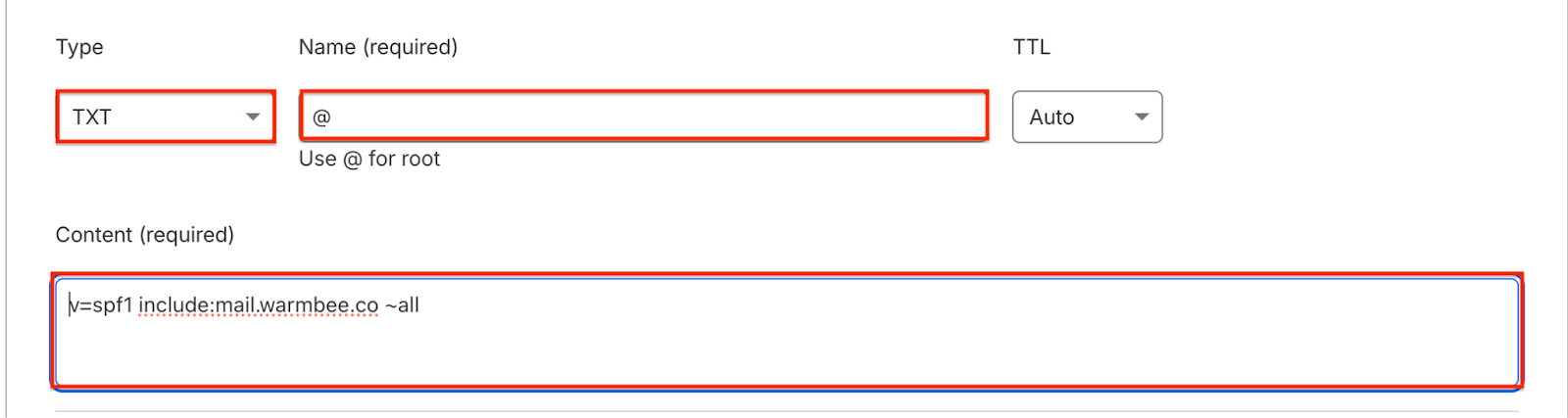
DKIM Configuration
In addition to the SPF record, we will also provide a DKIM record that needs to be published in your DNS.
DKIM (DomainKeys Identified Mail) helps verify that emails sent from your domain are authentic and have not been modified during transmission.
For Warmy servers, we use the default DKIM selector:
“dkim”
DNS Record Settings
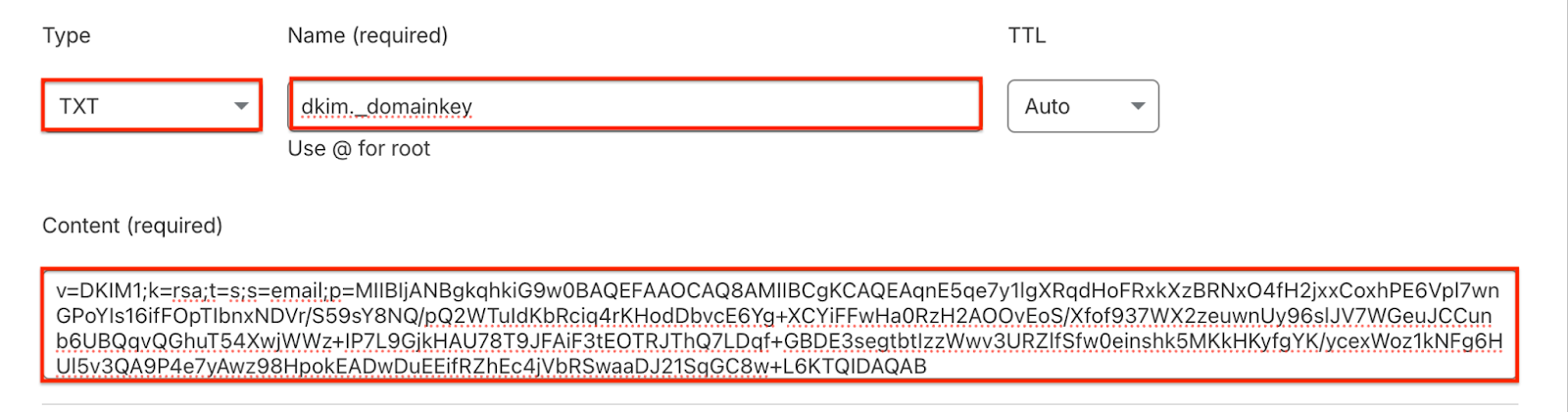
Record Type: TXT
Record Name / Host:
dkim._domainkey or dkim._domainkey.yourdomain.com
(This depends on your DNS provider. If the provider automatically appends your domain name, simply enter dkim._domainkey. Otherwise, enter the full host name dkim._domainkey.yourdomain.com.)
Record Value / Content:
v=DKIM1; k=rsa; t=s; s=email; p=MIIBIjANBgkqhkiG9w0BAQEFAAOCAQ8AMIIBCgKCAQEAqnE5qe7y1lgXRqdHoFRxkXzBRNxO4fH2jxxCoxhPE6Vpl7wnGPoYIs1…
Please see the screenshot below (DNS Cloudflare):
⚠️ Note:
The DKIM public key (p= value) is unique for every domain, so the value you receive from your CSM will be different from the example above.
Important Notes
- Make sure there are no other DKIM records in your DNS using the same selector “dkim”.
- Each DKIM record must have a unique selector.