---
title: How to configure SparkPost?
description: Welcome to SparkPost configuration 👋
---
[Skip to content](https://support.warmy.io/knowledge/how-to-configure-sparkpost#main-content)
English
Show submenu for translations
![Group 1261151152.png\]](https://support.warmy.io/hs-fs/hubfs/Group%201261151152.png?width=50&height=50&name=Group%201261151152.png)
Open main navigation
Close main navigation
- English
Show submenu for translations
- [Go to warmy.io](https://www.warmy.io/)
[Go to warmy.io](https://www.warmy.io/)
Hey there Warmer! How can we help? 🙏
- There are no suggestions because the search field is empty.
1. [Help Center](https://support.warmy.io/knowledge?hsLang=en)
2. [Connection Guide](https://support.warmy.io/knowledge/connection-guide?hsLang=en)
# How to configure SparkPost?
## Welcome to SparkPost configuration 👋
🎧 Prefer to listen? Hit play to hear this article read aloud. 🔊
### 🔗 How to Connect SparkPost SMTP to Warmy
To start warming up your email with **Warmy** using **SparkPost**, you need to fill out the SMTP connection form inside our product. You may locate it by clicking on the **+Mailbox button** in the top right corner of the dashboard. 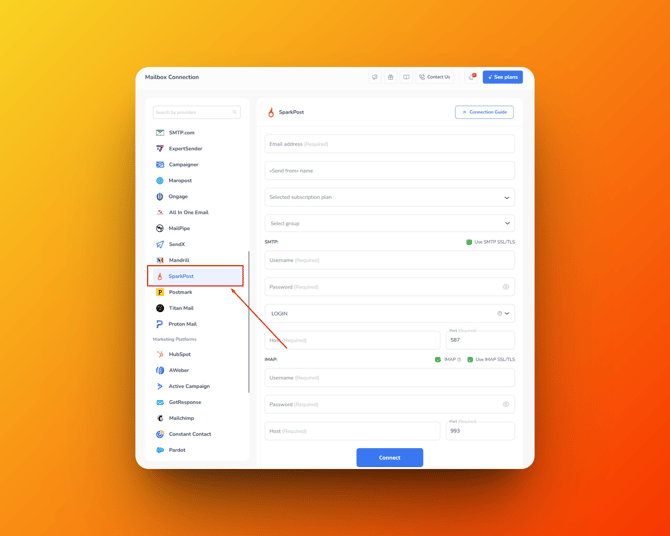
#### 1️⃣ Basic Warmy Settings
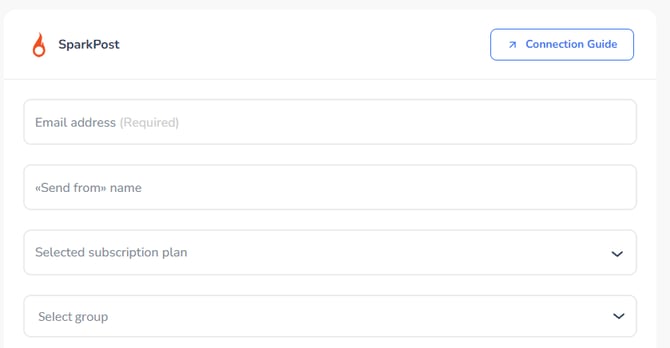
In the connection form (see screenshot), please fill in the following:
- **Email address** – enter the email address you want to warm up.
- **«Send from» name** – choose a name or phrase that will appear as the sender in all warm-up emails.
- **Selected subscription plan** – pick your subscription plan.
- **Select group** – if you use groups in Warmy, choose the one you want
#### 2️⃣ SparkPost SMTP Settings
Next, enter your SparkPost SMTP credentials. Use the following values:
- **Host:**
- `smtp.sparkpostmail.com`
- `smtp.eu.sparkpostmail.com` (for SparkPost EU accounts)
- **Port:**
- `587` (recommended)
- `2525` (alternative, if 587 is blocked)
- **Encryption:** `STARTTLS` checkmark is set by default
- **Authentication:** `LOGIN`
- **Username:** `SMTP_Injection`
- For subaccounts, use:
`SMTP_Injection:X-MSYS-SUBACCOUNT=123`
(replace `123` with your subaccount ID).
- **Password:** An API Key with **"Send via SMTP"** permission - you can create/manage API keys in the **[app](https://app.sparkpost.com/account/api-keys) ([EU](https://app.eu.sparkpost.com/account/api-keys))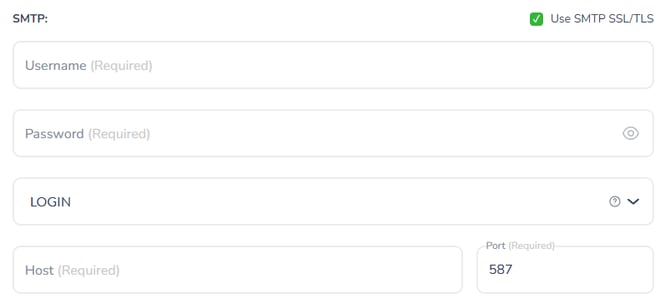**
Once all fields are filled, click **Connect** ✅
**SparkPost Enterprise customers** should contact their **Technical Account Manager** for SMTP connection details
#### 3️⃣ IMAP Option (Optional)
- The **IMAP option** can be left **disabled** – it is only responsible for **receiving warm-up emails**, and it’s not required for sending.
- However, if you want to enable IMAP, you can connect any mailbox that supports IMAP, for example, **a Gmail inbox**. This way, Warmy will also simulate receiving and replying during the warm-up process.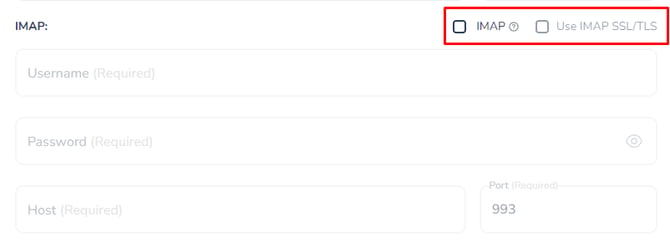
#### 4️⃣ Extra Options
- **Custom headers** – If you need to use a custom header (e.g., `X-MSYS-API` for campaign IDs, metadata, IP pools, CC, BCC, etc.), just contact our [Support team](https://www.warmy.io/dashboard/support). We’ll be happy to help and enable it for you.
- **Subaccounts** – When sending on behalf of a subaccount, make sure to use the correct subaccount ID in the username and a valid API key from the parent account as the password.
#### [Need help? **Schedule a call with us 👨🏻💻**](https://www.warmy.io/book-a-support-call)
- [Connection Guide](https://support.warmy.io/knowledge/connection-guide?hsLang=en)
- [General questions](https://support.warmy.io/knowledge/general-questions?hsLang=en)
- [Technical questions](https://support.warmy.io/knowledge/technical-questions?hsLang=en#main-content)
- [SPF and DKIM Configuration](https://support.warmy.io/knowledge/technical-questions?hsLang=en#spf-and-dkim-configuration)
- [Subscription](https://support.warmy.io/knowledge/subscription?hsLang=en)
- [Collaborate](https://support.warmy.io/knowledge/collaborate?hsLang=en)
- [Features](https://support.warmy.io/knowledge/features?hsLang=en)
- [Troubleshooting](https://support.warmy.io/knowledge/troubleshooting?hsLang=en#main-content)
- [SMTP Errors](https://support.warmy.io/knowledge/troubleshooting?hsLang=en#smtp-errors)
- [Service-related issues](https://support.warmy.io/knowledge/troubleshooting?hsLang=en#service-related-issues)
- [Integrations](https://support.warmy.io/knowledge/integrations?hsLang=en#main-content)
- [Seed List Automations](https://support.warmy.io/knowledge/integrations?hsLang=en#seed-list-automations)
[](https://www.warmy.io/)
warmy.io Help Center
Copyright © 2026, AnyBiz LTD