---
title: How to integrate HubSpot with Warmy?
description: In this article, we will tell you and help you connect your Hubspot account to Warmy in the form of step-by-step instructions. After that, you can import your templates and warm them up with the click of a couple of buttons
---
[Skip to content](https://support.warmy.io/knowledge/how-to-integrate-hubspot-with-warmy#main-content)
English
Show submenu for translations
![Group 1261151152.png\]](https://support.warmy.io/hs-fs/hubfs/Group%201261151152.png?width=50&height=50&name=Group%201261151152.png)
Open main navigation
Close main navigation
- English
Show submenu for translations
- [Go to warmy.io](https://www.warmy.io/)
[Go to warmy.io](https://www.warmy.io/)
Hey there Warmer! How can we help? 🙏
- There are no suggestions because the search field is empty.
1. [Help Center](https://support.warmy.io/knowledge?hsLang=en)
2. [General questions](https://support.warmy.io/knowledge/general-questions?hsLang=en)
# How to integrate HubSpot with Warmy?
## In this article, we will tell you and help you connect your Hubspot account to Warmy in the form of step-by-step instructions. After that, you can import your templates and warm them up with the click of a couple of buttons
🎧 Prefer to listen? Hit play to hear this article read aloud. 🔊

If you use HubSpot for your email campaigns, you can now connect it directly to Warmy and import your templates with a single click. This means your warm-up emails will reflect your real sending content, which helps build a stronger, more relevant sender reputation.
Here's how to set it up:
---
#### Step 1 — Go to Workspace Settings
In your Warmy account, navigate to the **Workspace** tab (top left corner) and open **Settings**. From there, select the **Integrations** tab.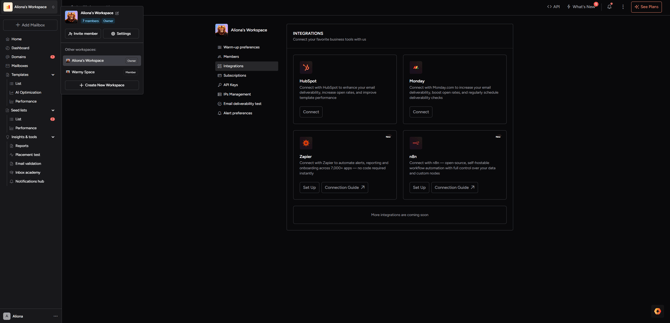
---
#### Step 2 — Connect HubSpot
Find HubSpot in the integrations list and click **Connect**. You'll be redirected to the HubSpot login page.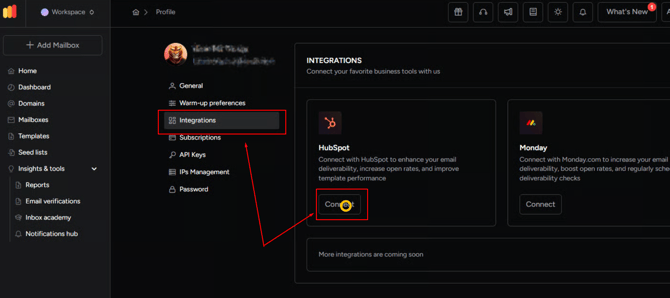
---
#### Step 3 — Log In and Authorize
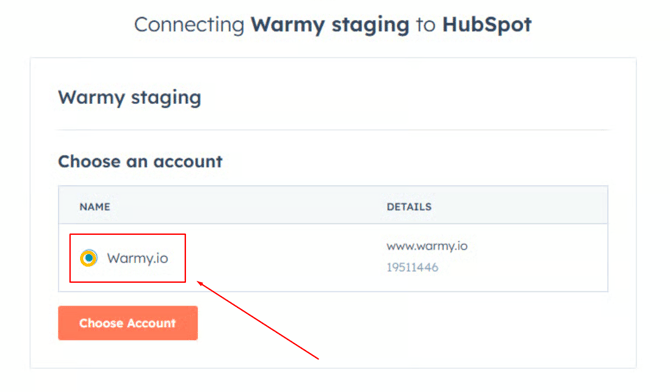
Log in to your HubSpot account. In the next window, select **Warmy** to grant access and complete the authorization.
That's it — Warmy is now integrated with your HubSpot account! ✅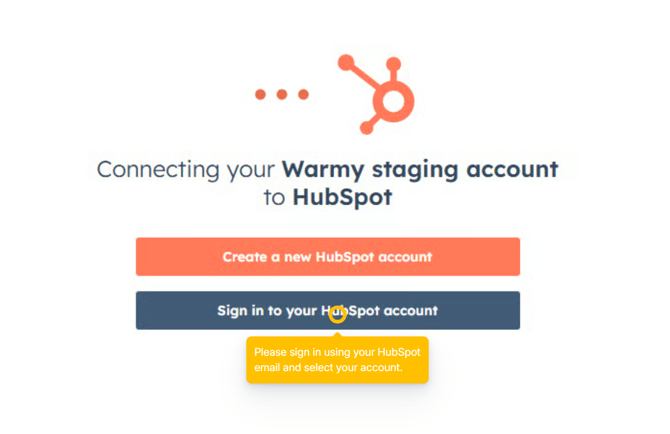
---
#### Step 4 — Import Templates from HubSpot
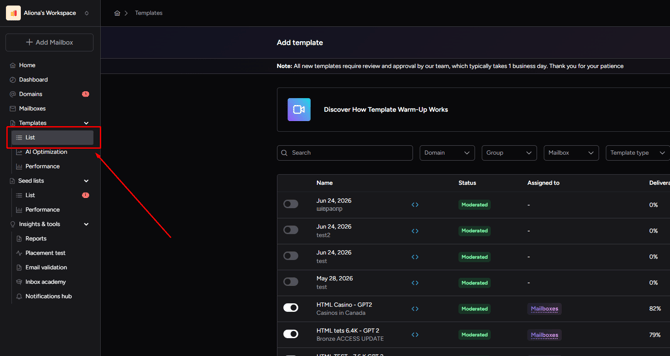
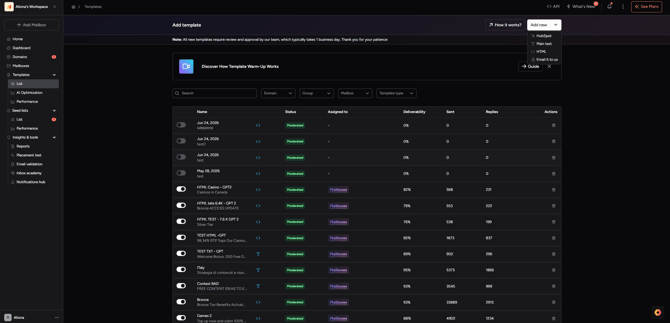
To import your templates, go to the **Templates** tab in Warmy and select the **List** tab. Click **Add New** and choose the **HubSpot** option. Your templates will be imported automatically after a short delay.
---
#### All Done! 🎉
Your HubSpot templates are now available in Warmy and ready to be used in your warm-up. The more relevant templates you add, the better your warm-up results will be.
If you have any questions, our support team is available 24/7 via live chat or at [hi@warmy.io](mailto:hi@warmy.io).
#### [Need help? **Schedule a call with us 👨🏻💻**](https://www.warmy.io/book-a-support-call)
- [Connection Guide](https://support.warmy.io/knowledge/connection-guide?hsLang=en)
- [General questions](https://support.warmy.io/knowledge/general-questions?hsLang=en)
- [Technical questions](https://support.warmy.io/knowledge/technical-questions?hsLang=en#main-content)
- [SPF and DKIM Configuration](https://support.warmy.io/knowledge/technical-questions?hsLang=en#spf-and-dkim-configuration)
- [Subscription](https://support.warmy.io/knowledge/subscription?hsLang=en)
- [Collaborate](https://support.warmy.io/knowledge/collaborate?hsLang=en)
- [Features](https://support.warmy.io/knowledge/features?hsLang=en)
- [Troubleshooting](https://support.warmy.io/knowledge/troubleshooting?hsLang=en#main-content)
- [SMTP Errors](https://support.warmy.io/knowledge/troubleshooting?hsLang=en#smtp-errors)
- [Service-related issues](https://support.warmy.io/knowledge/troubleshooting?hsLang=en#service-related-issues)
- [Integrations](https://support.warmy.io/knowledge/integrations?hsLang=en#main-content)
- [Seed List Automations](https://support.warmy.io/knowledge/integrations?hsLang=en#seed-list-automations)
[](https://www.warmy.io/)
warmy.io Help Center
Copyright © 2026, AnyBiz LTD