![Group 1261151152.png]](https://support.warmy.io/hs-fs/hubfs/Group%201261151152.png?width=50&height=50&name=Group%201261151152.png)

🎧 Prefer to listen? Hit play to hear this article read aloud. 🔊
[Audio will be available soon]
<< Click here to Go straight to the Example of Use >>
This n8n workflow automatically updates a Klaviyo list every day. It randomly selects a slightly larger group of profiles from a source list and replaces the campaign list with the new selection, helping your audience grow naturally while keeping recipients fresh and varied.
Workflow Summary
|
Workflow Name |
Klaviyo Update List For Campaign |
| Trigger | Daily at 8:00 AM (Schedule Trigger) |
| Platform | Klaviyo (via REST API, revision 2026-04-15) |
| Total Nodes | 10 |
| Status | Inactive (activate after configuring list IDs and credentials) |
How it Works
The workflow executes the following steps each time it runs:
Fetch all profiles from the source list. The workflow paginates through the source Klaviyo list, collecting all available profiles.
Deduplicate and shuffle. Duplicate profile IDs are removed, then the full list is randomly shuffled using the Fisher-Yates algorithm.
Determine the new target count. The current size of the main list is retrieved. A random growth rate between 4% and 7% is applied to calculate how many profiles to add during this run.
Clear the main list. If the main list already contains profiles, they are all removed using a DELETE request.
Populate with new profiles. The shuffled source profiles are sliced to the target count and added to the main list using a POST request.
Node Reference
| Node Name | Type | Description |
|
Schedule Trigger |
Schedule Trigger |
Fires daily at 8:00 AM to start the workflow. |
|
Set Workflow Global Variables |
Set |
Defines the source and main Klaviyo list IDs used throughout the workflow. |
|
Get Source List Profiles |
HTTP Request (GET) |
Fetches all profiles from the source Klaviyo list using cursor-based pagination (up to 1,000 per page). |
|
Get & Shuffle Source Profiles |
Code |
Deduplicates and Fisher-Yates shuffles all fetched profiles; passes the full shuffled list downstream. |
|
Get Current Main List Profiles |
HTTP Request (GET) |
Retrieves existing profiles in the main Klaviyo list (up to 1,000). |
|
Build Delete Payload |
Code |
Calculates the new target count (4%–7% growth), builds the delete payload from current profiles, and determines whether any deletions are needed. |
|
Has Profiles to Delete? |
If (Conditional) |
Branches: if there are existing profiles, route to deletion first; otherwise skip straight to adding. |
|
Remove All Profiles from Main List |
HTTP Request (DELETE) |
Sends a DELETE request to remove all current profiles from the main list. |
|
Build Add Payload |
Code |
Slices the shuffled source profiles down to the new target count and builds the add payload. |
|
Add Random Profiles to Main List |
HTTP Request (POST) |
POSTs the selected profiles to the main Klaviyo list. |
Execution Flow
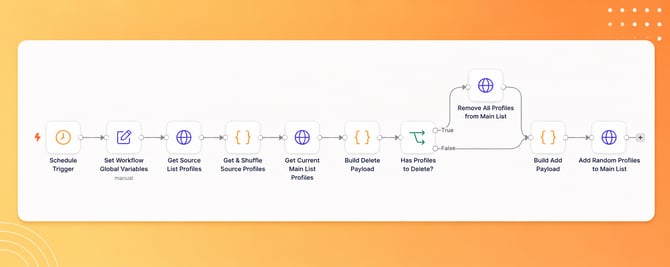
Credentials
This workflow uses two separate Klaviyo API credential entries in n8n. Both must be configured with valid Klaviyo private API keys before the workflow is activated.
| Credential Name | Used By | Scope Needed |
| Klaviyo Auth | Get Current Main List Profiles, Add Random Profiles to Main List, Get Source List Profiles, Remove All Profiles from Main List | Read + write access to Klaviyo lists |
To set up credentials in n8n: navigate to Credentials → New Credential → HTTP Header Auth, and set the header name to Authorization with value Bearer YOUR_KLAVIYO_PRIVATE_KEY.
All Configuration Parameters
| Parameter | Value | Notes |
|
klaviyo_list_id_main |
list_id (placeholder) |
Replace with your actual main campaign list ID |
|
klaviyo_list_id_source |
list_id (placeholder) |
Replace with your actual source list ID |
|
Schedule time |
08:00 daily |
Configurable in Schedule Trigger node |
|
Growth rate |
4%–7% (randomized) |
Hardcoded in Build Delete Payload node |
|
Page size |
1,000 profiles/page |
Maximum allowed by Klaviyo API |
|
API Revision |
2026-04-15 |
Set in all HTTP Request headers |
Growth Rate Calculation
Each time the workflow runs, the Build Delete Payload node calculates a new target size for the main list.
growthRate = 1.04 + Math.random() * 0.03 // results in 4%–7% growth
newCount = Math.round(currentCount * growthRate)
cappedCount = Math.min(newCount, totalInSource) // never exceeds source list size
The growthRate variable generates a random growth rate between 4% and 7%. The newCount variable calculates the new target size based on the current number of profiles in the main list. Finally, cappedCount ensures that the target size never exceeds the total number of profiles available in the source list.
If the main list is empty (currentCount = 0), the workflow uses a base count of 30 profiles to bootstrap the first run.
Shuffle Algorithm
The Get & Shuffle Source Profiles node uses the Fisher-Yates (Knuth) shuffle algorithm to randomly shuffle all profiles in the source list. This ensures that every profile in the source list has an equal chance of being selected each time the workflow runs.
Pagination
The Get Source List Profiles node uses Klaviyo's cursor-based pagination to retrieve all profiles from the source list.
A 1-second delay is added between requests to respect Klaviyo's API rate limits. Pagination automatically stops when the response no longer contains a next link.
Conditional Delete
The Has Profiles to Delete? node checks whether the main list contains any profiles before sending the DELETE request.
If the main list is already empty, the DELETE request is skipped. Both branches then continue to the Build Add Payload node, so the add step always runs regardless.
Setup Checklist
Before activating the workflow, configure both Klaviyo Auth and Klaviyo Update List credentials in n8n using valid private API keys.
Next, update klaviyo_list_id_main and klaviyo_list_id_source in the Set Workflow Global Variables node.
Verify that 2026-04-15 is still a valid Klaviyo API revision, or update it to the latest available version if needed.
Run the workflow manually once with a small source list to verify that all API calls complete successfully.
Once everything has been verified, activate the workflow to begin the daily schedule.
Notes and Limitations
This workflow currently supports only one source-main list pair. To manage multiple pairs, duplicate the workflow or extend the Set Workflow Global Variables node to loop through multiple pairs.
Klaviyo's API accepts up to 1,000 profiles per request. If the target count exceeds 1,000 profiles, the Add Random Profiles node may need to be updated to send requests in batches.
Only profile IDs are transferred. No profile attribute data, such as email addresses or names, is read or modified.
A 1-second delay is applied between pagination requests. If the source list contains more than 10,000 profiles, the workflow execution time will increase accordingly.
If the DELETE request succeeds but the POST request fails, the main list will remain empty until the next scheduled run or until the workflow is run manually again.
Example of Use
Before you can use this automation, you need to complete a few setup steps.
Step 1: Configure the Workflow VariablesThe first thing you need to do is set up the global variables used by the workflow.
- Open the workflow in n8n.
- Find the Set Workflow Global Variables node.
- Double-click the node to open it.
- Update the required values with your own information before running the workflow.
These variables are used throughout the entire automation, so make sure all the information is correct before moving to the next step.
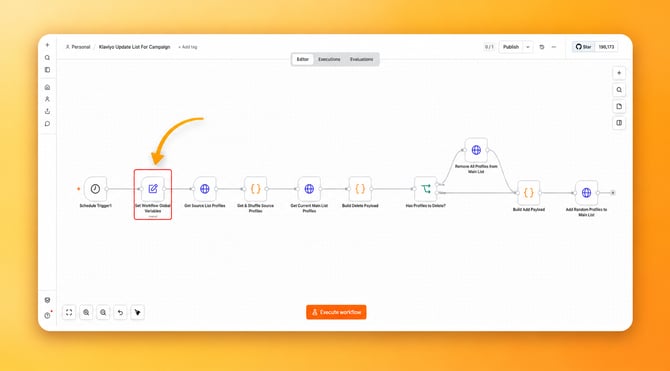
Step 2: Once you open the node, you will see a window similar to the one below.
Now, update the following variables with your own List IDs:
- klaviyo_list_id_main
This is the ID of the completely new list you just created. This list will be used in the future for sending daily warm-up emails, gradually increasing and rotating them. - klaviyo_list_id_source
This is the ID of the list you previously created with the client that contains all of the splits. It can contain 2,000, 5,000, or any other number of contacts.
Replace the example values shown in the highlighted fields with your own List IDs, as shown in the image below.
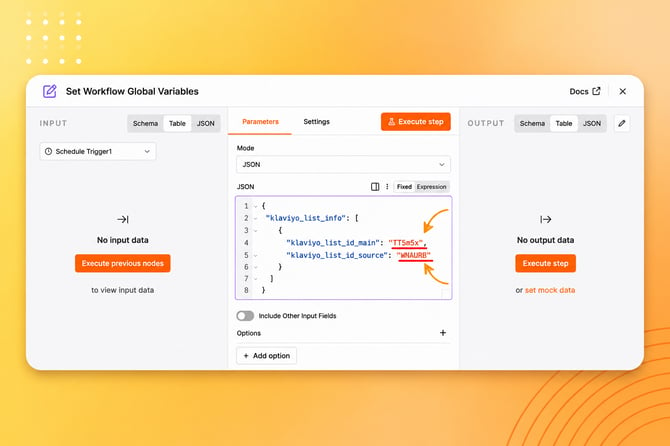
Note: Make sure you enter the correct List ID for each variable. These values are required for the automation to work properly.
Step 3: Next, you need to set up the API connection for the four HTTP Request nodes in the workflow.
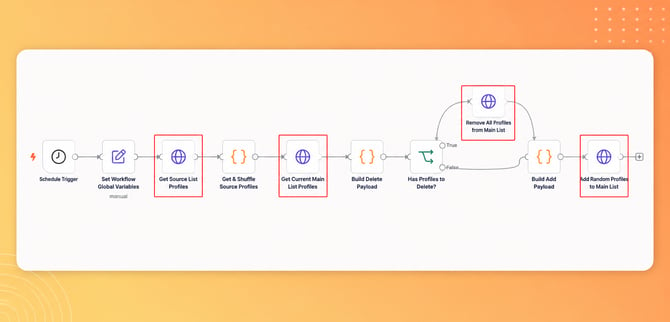
You can use the same Klaviyo API key that you created for the previous workflow (such as the Update and Rotate Seed List workflow), or you can create a new one. If you create a new API key, make sure it has List permissions enabled.
To configure the connection, either edit the existing credential or create a new one.
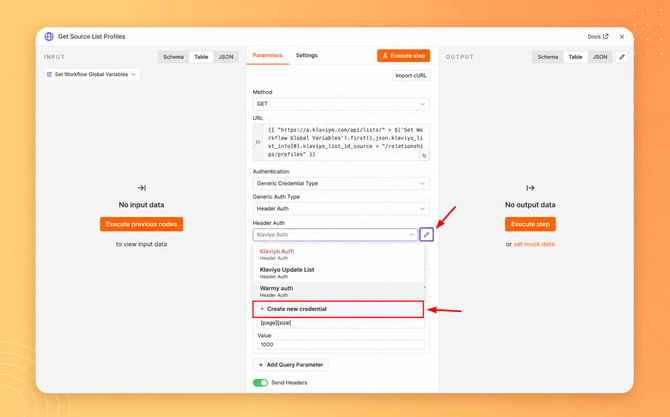
According to the Klaviyo documentation:
- In the Key field, enter
Authorization. - In the Value field, enter
Klaviyo-API-Key(including the space after it), followed by your Klaviyo API key.
Authorization: <Klaviyo-API-Key> <your-private-api-key>
Note: Enter Klaviyo-API-Key followed by a single space and then your actual private API key. Do not include the < > symbols. Make sure to keep the space between Klaviyo-API-Key and your private API key.
Once the API connection is configured for all four HTTP Request nodes, the workflow is ready to run. You can Execute the workflow to test.