![Group 1261151152.png]](https://support.warmy.io/hs-fs/hubfs/Group%201261151152.png?width=50&height=50&name=Group%201261151152.png)
 Prefer to listen? Hit play to hear this article read aloud.
Getting Started with Your Seed List
Note: Not sure which Seed List or how many seeds are right for your setup? Contact our Support team, and we'll help you choose the most suitable option 🙂
- Why: A Seed List is designed to help monitor and improve email deliverability by testing your emails across multiple platforms.
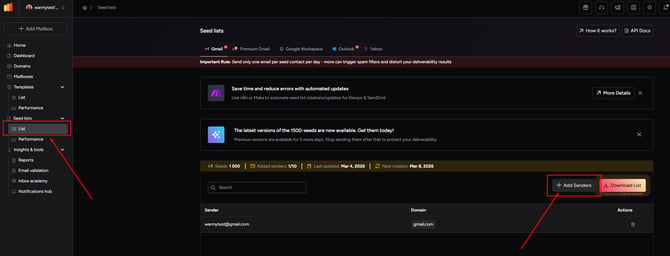
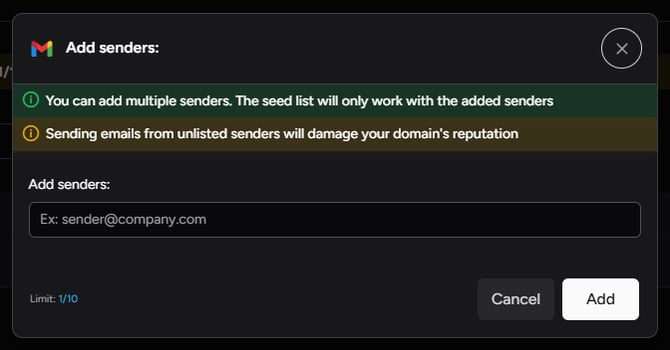
- How: Once your Seed List feature is enabled, add your sender email to get started. This is required before sending emails to the Seed List.
Usage Rules for Sending Emails
- Only Use Registered Sender Emails: Ensure emails are sent only from verified sender emails on your Seed List. Unregistered emails will be marked as spam and removed.
- Outdated Seed List Version: The Seed List is regularly updated, so please download the latest version periodically from the website.
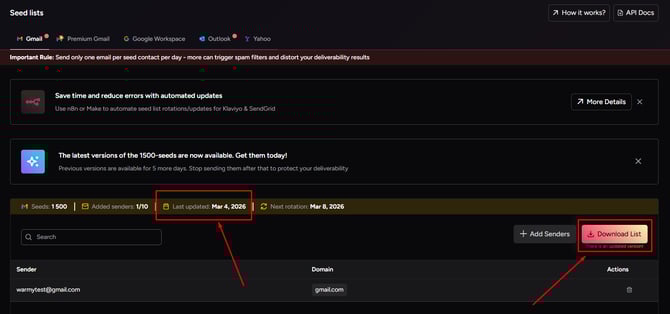
You'll also receive email notifications when an updated list of seeds is available. These notifications will be sent to the email address used to sign up for Warmy and will only be triggered if there are changes to the seed list
- Note: Access to the seed list is disabled once your subscription expires
-
Editing Sender Emails:
- Old Sender Emails: When a sender email is replaced, the old sender email will remain active in the system for 12 hours, ensuring that any previously sent emails are still processed correctly.

- Old Sender Emails: When a sender email is replaced, the old sender email will remain active in the system for 12 hours, ensuring that any previously sent emails are still processed correctly.
- Delays After Changes: You can download your Seed List immediately after adding or editing a sender email. However, wait at least 1 hour before sending emails to the Seed List to allow the sender verification process to complete. There is currently no verification status indicator in the interface, so you will need to track this 1-hour wait yourself.
You can add and remove multiple verified sender email addresses as needed without limitations!
Seed List Usage Guidelines
After adding your senders in Warmy and downloading the Seed List, follow these steps:
-
Create your email campaign in your Email Service Provider (ESP) and send it to the Seed List once per day.
-
Do not mix emails from the Seed List with real campaigns to keep the data accurate.
-
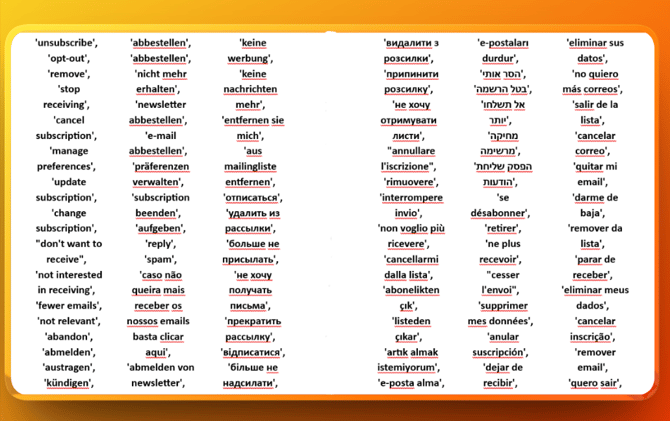
Ensure your unsubscribe link includes the correct terms so the script recognizes and skips them.
- For large Seed Lists (e.g., over 1,000 emails): you can split the list into 2–3 batches and send to each batch on consecutive days.
Seed List Behavior
You can customize how the Seed List interacts with your emails directly from the Warmy interface.
On the Seed Lists page, click the Behavior button in the top right corner to open the settings panel.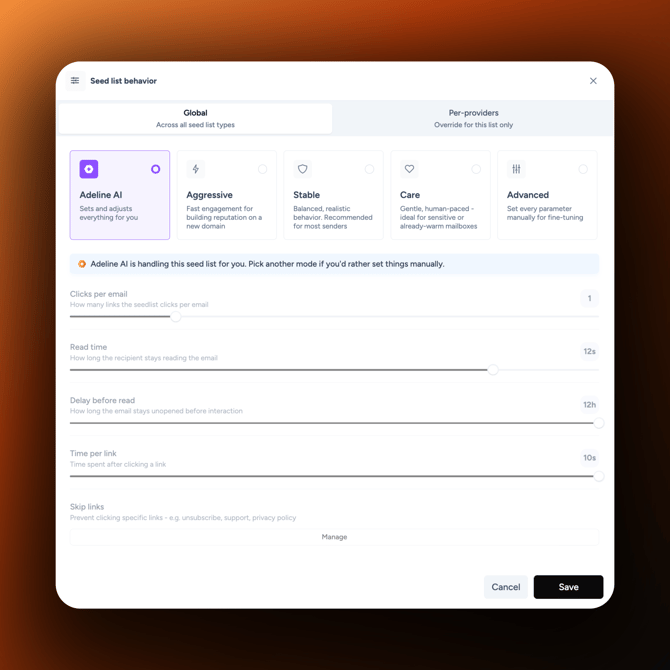
The Global tab applies your settings across all seed list types. You can choose from five modes:
- Adeline AI: Sets and adjusts everything for you.
- Aggressive: Fast engagement for building reputation on a new domain.
- Stable: Balanced, realistic behavior recommended for most senders.
- Care: Gentle, human-paced behavior for sensitive or already-warm mailboxes.
- Advanced: Set every parameter manually for fine-tuning.
In Advanced mode, you can configure:
- Clicks per email
- Read time
- Delay before read
- Time per link
- Skip links
Skip links allows you to prevent the Seed List from clicking specific links, such as unsubscribe, support, or privacy links.
The Per-providers tab lets you override the Global settings for individual providers. Custom provider settings take priority over the Global settings for that provider.
Click Save to apply your changes. Saved settings may take up to 2 hours to take effect.
Best Practices for Using Seed Lists ✅
-
Start small: Do not send to the full Seed List initially. Begin with a few hundred emails and gradually increase the volume.
-
Monitor deliverability: Continuously check Google Postmaster and Microsoft SNDS for available deliverability and sender health metrics.
-
Use caution with links: Seed account interactions depend on your Seed List Behavior settings. Use Skip links to prevent seed accounts from clicking specific URLs when needed.
-
Stagger delivery: Avoid sending all emails at once—spread them out to maintain healthy campaign performance.
-
Mirror live campaigns: Send emails to Seed Lists with copy as close as possible to your live campaign for accurate insights.
Following these steps ensures that your warm-up and reputation monitoring remain reliable and that Seed List metrics reflect real deliverability conditions.
Common Issues & Troubleshooting
-
Unsubscribe links not working properly: