---
title: Warmy Workspaces
description: Warmy Workspaces
---
[Skip to content](https://support.warmy.io/knowledge/warmy-workspaces#main-content)
English
Show submenu for translations
![Group 1261151152.png\]](https://support.warmy.io/hs-fs/hubfs/Group%201261151152.png?width=50&height=50&name=Group%201261151152.png)
Open main navigation
Close main navigation
- English
Show submenu for translations
- [Go to warmy.io](https://www.warmy.io/)
[Go to warmy.io](https://www.warmy.io/)
Hey there Warmer! How can we help? 🙏
- There are no suggestions because the search field is empty.
1. [Help Center](https://support.warmy.io/knowledge?hsLang=en)
2. [Features](https://support.warmy.io/knowledge/features?hsLang=en)
# Warmy Workspaces
## Learn how to use Warmy Workspaces to organize your team, invite members, manage access, and switch between multiple workspaces.
#### **👀 Please take a look in the video with the steps if you need any help 😎**
---
**🎧 Prefer to listen? Hit play to hear this article read aloud.**
---
### **Warmy Workspaces: Managing Your Team and Access**
#### **Introduction**
Warmy Workspaces make it easier to work with your team while keeping access organized. You can invite other users to a workspace, assign access as members, and switch between workspaces you have access to.
You can also create multiple workspaces and invite different people to each one, depending on how you want to organize your Warmy account.
**Important:** Each Warmy Workspace has its own members, subscription, and billing. Workspace access and permissions are managed separately for each workspace.
**What Can You Do With Workspaces?**
With Warmy Workspaces, you can:
• Invite other users to your workspace by email.
• Add team members at no additional cost.
• Create multiple workspaces.
• Invite different users to different workspaces.
• Switch between workspaces you have access to.
• Manage your team and workspace access from the **Workspaces** tab.
If the person you invite already has a Warmy account, they can log in and accept the invitation. If they're new to Warmy, they'll need to sign up first.
Once the invitation is accepted, the user becomes a **Member** of the workspace.
---
#### **Workspace Roles**
Each workspace has two roles: **Owner** and **Member**.
**Owner**
The **Owner** has full control over the workspace and is the only role that can manage certain workspace settings.
The Owner can:
• Manage the workspace.
• Access workspace member management.
• Invite users.
• Suspend or restore members.
• Manage the workspace subscription and plan from **See Plans**.
There can only be **one Owner per workspace**.
How to change the workspace Owner
- If you want to change the workspace Owner, and you are the current Owner, you can do it yourself in the Warmy settings:
- In the bottom-left corner, click your account name.
- Select Settings.
- Open the General tab.
- Update the Email address field to the new Owner's email.
- Click Save.
If you run into any issues, contact Warmy Support.
**Member**
A **Member** can manage the workspace and perform most actions available in the workspace.
Members can use most workspace features, but some actions are restricted. A Member cannot:
• Invite new users.
• Suspend or restore users.
• Access the full **See Plans** view.
• Manage the workspace subscription or plan.
Members can still see a restricted **See Plan** view, but they don't have access to the same plan management options available to the Owner.
**Note:** Adding Members to a workspace is free of charge.
---
#### **Member Statuses**
Workspace members can have one of three statuses:
**Active**
An **Active** member has accepted the invitation and currently has access to the workspace.
**Invited**
An **Invited** user has been sent an invitation but has not yet joined the workspace.
Workspace invitations **do not expire**, so the invitation remains available until the user accepts it or the workspace access is otherwise changed.
**Suspended**
A **Suspended** member no longer has access to the workspace.
The Owner can suspend or restore members from the workspace's member management area.
---
#### **Workspace Limits**
A Warmy user can:
• Be a member of **unlimited workspaces**.
• Create up to **100 workspaces** as an Owner.
This means you can participate in as many workspaces as you need, while the number of workspaces you can create yourself as an Owner is limited to 100.
**Note:** The 100-workspace limit applies to workspaces you create as an Owner. It does not limit the number of workspaces where you are a Member.
---
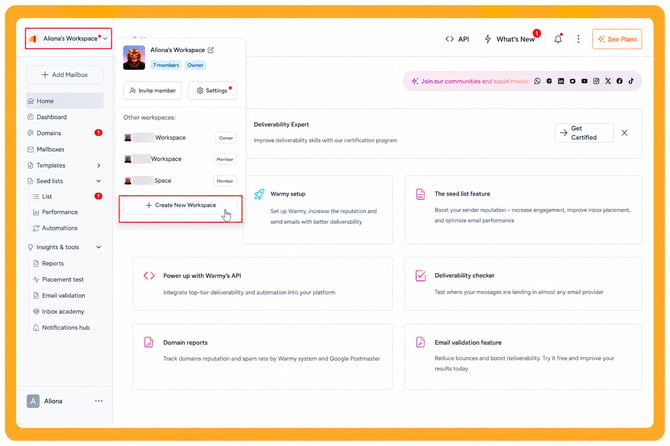
#### **Creating a Workspace**
Creating a new workspace is simple.
1\. Open the **Workspaces** tab.
2\. Choose the option to create a new workspace.
3\. Enter a name for the workspace.
4\. Create the workspace.
The workspace is created immediately after you provide its name.
You can then invite other users or start using the workspace yourself.
**What Happens If You Have No Active Workspaces?**
If you no longer have access to any active workspaces, Warmy automatically creates a new workspace for you with a default name.
You become the **Owner** of this new workspace.
---
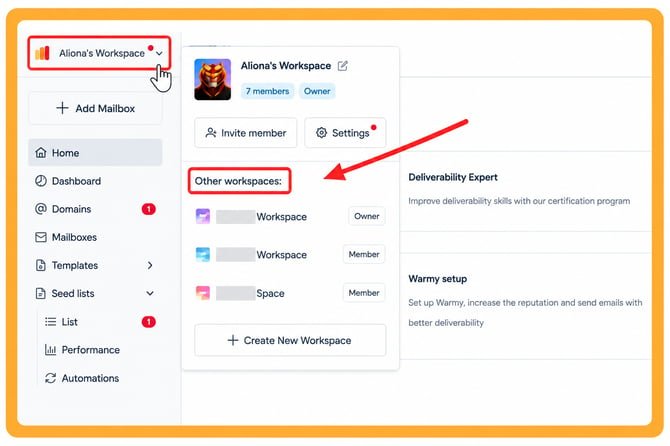
#### **How to Switch Between Workspaces**
If you have access to multiple workspaces, you can switch between them from your Warmy account.
1\. Open the workspace selector.
2\. Find the workspace you want to use.
3\. Select it.
Warmy will switch your current workspace, and you'll see the data and settings associated with that workspace.
**Tip:** Make sure you're working in the correct workspace before making changes, especially when managing members or workspace settings.
---
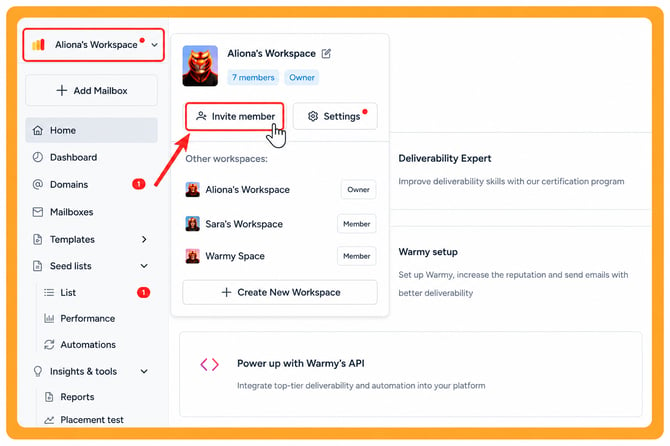
#### **How to Add a New Member**
You can invite a user directly from the **Workspaces** tab.
1\. Go to the **Workspaces** tab.
2\. Click **Invite User**.
3\. Enter the email address of the person you want to invite.
4\. Send the invitation.
The user will receive an invitation to join the workspace.
If they already have a Warmy account, they can log in and accept the invitation. If they don't have an account yet, they need to sign up before joining the workspace.
Once the invitation is accepted, their status changes from **Invited** to **Active**.
---
#### **How Workspace Access Works**
Workspace access is separate for each workspace. For example, you can be:
• An **Owner** of one workspace.
• A **Member** of another workspace.
• A **Member** of several other workspaces.
Your role and permissions depend on the specific workspace you're currently using. This allows teams to organize access based on the people who need to work together in each workspace.
---
#### **Subscriptions and Billing**
Subscriptions are independent for each workspace. Each workspace has its own:
• Subscription.
• Billing.
• Plan.
A subscription belonging to one workspace does not automatically apply to another workspace.
The **Owner** can manage the workspace's subscription and plan from **See Plans**.
Members don't have access to the full plan management options. They may see a restricted **See Plan** view instead.
---
#### **Expected Result**
After setting up your Workspaces, you can organize your Warmy account and team based on the access each person needs.
You should be able to:
• Create and switch between multiple workspaces.
• Invite users to specific workspaces.
• Identify members by their **Active**, **Invited**, or **Suspended** status.
• Give team members access without additional workspace member fees.
• Manage workspace permissions through the Owner and Member roles.
• Keep subscriptions and billing separate between workspaces.
#### [Need help? **Schedule a call with us**](https://www.warmy.io/book-a-support-call)
- [Connection Guide](https://support.warmy.io/knowledge/connection-guide?hsLang=en)
- [General questions](https://support.warmy.io/knowledge/general-questions?hsLang=en)
- [Technical questions](https://support.warmy.io/knowledge/technical-questions?hsLang=en#main-content)
- [SPF and DKIM Configuration](https://support.warmy.io/knowledge/technical-questions?hsLang=en#spf-and-dkim-configuration)
- [Subscription](https://support.warmy.io/knowledge/subscription?hsLang=en)
- [Collaborate](https://support.warmy.io/knowledge/collaborate?hsLang=en)
- [Features](https://support.warmy.io/knowledge/features?hsLang=en)
- [Troubleshooting](https://support.warmy.io/knowledge/troubleshooting?hsLang=en#main-content)
- [SMTP Errors](https://support.warmy.io/knowledge/troubleshooting?hsLang=en#smtp-errors)
- [Service-related issues](https://support.warmy.io/knowledge/troubleshooting?hsLang=en#service-related-issues)
- [Integrations](https://support.warmy.io/knowledge/integrations?hsLang=en#main-content)
- [Seed List Automations](https://support.warmy.io/knowledge/integrations?hsLang=en#seed-list-automations)
[](https://www.warmy.io/)
warmy.io Help Center
Copyright © 2026, AnyBiz LTD