![Group 1261151152.png]](https://support.warmy.io/hs-fs/hubfs/Group%201261151152.png?width=50&height=50&name=Group%201261151152.png)
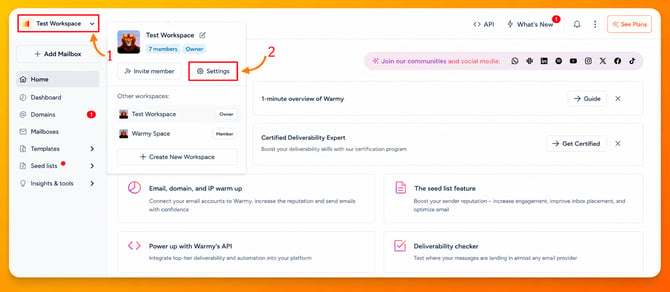
To generate an API Key, log in to your Warmy account and select the Workspace where you want to create the key. If you only have one Workspace, it will be selected automatically. If you manage multiple Workspaces, be sure to choose the correct one before proceeding.
Once you have selected the appropriate Workspace, click Settings.
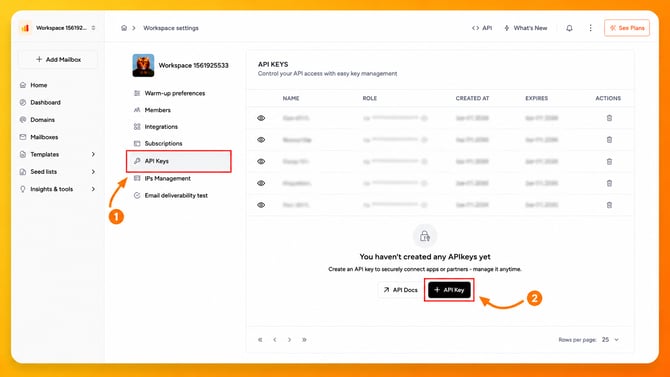
A menu will appear in the center of the screen. From there, click API Keys, then click the black + API Key button to create a new API Key.
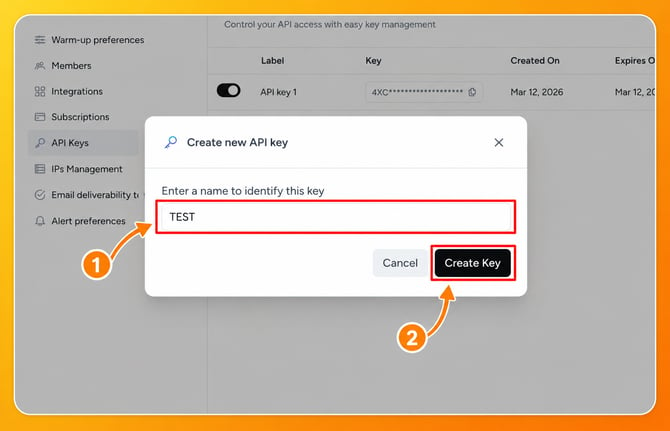
A small window will then open. Enter a name to help you identify this API Key later. You can choose any name you like. For this example, we'll use TEST. After entering the name, click Create Key to generate your API Key.
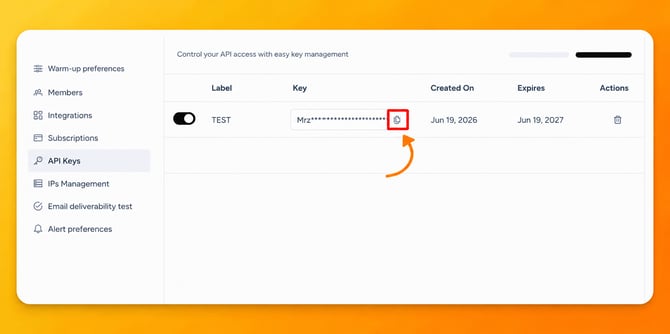
Once the API Key has been created, click the Copy icon to copy it to your clipboard.
And that's it!