---
title: Warmy. How does it work?
description: The Email deliverability platform that will help you reach more customers and boost sales
---
[Skip to content](https://support.warmy.io/knowledge/warmy-how-does-it-work#main-content)
English
Show submenu for translations
![Group 1261151152.png\]](https://support.warmy.io/hs-fs/hubfs/Group%201261151152.png?width=50&height=50&name=Group%201261151152.png)
Open main navigation
Close main navigation
- English
Show submenu for translations
- [Go to warmy.io](https://www.warmy.io/)
[Go to warmy.io](https://www.warmy.io/)
Hey there Warmer! How can we help? 🙏
- There are no suggestions because the search field is empty.
1. [Help Center](https://support.warmy.io/knowledge?hsLang=en)
2. [General questions](https://support.warmy.io/knowledge/general-questions?hsLang=en)
# Warmy. How does it work?
## The Email deliverability platform that will help you reach more customers and boost sales
🎧 Prefer to listen? Hit play to hear this article read aloud. 🔊
Are you tired of your emails landing in Spam? Warmy helps you build, monitor, and maintain strong email deliverability — all in one powerful platform.
Below is a guided tour of the main features and capabilities.
**Note:** Right now, logging into your Warmy account is done either via login/password or Google OAuth. 2FA isn't available yet.
---
#### 👥 Workspaces – Collaborate & Manage Access
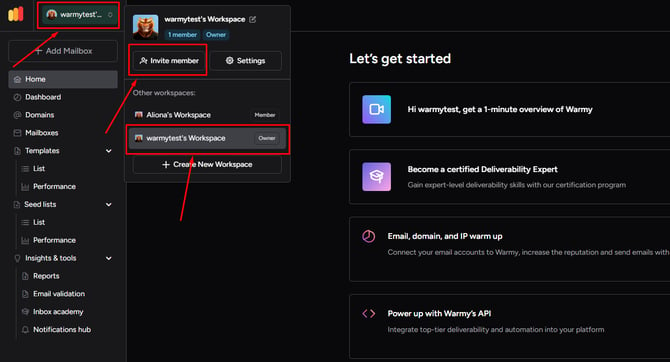
Warmy allows you to create **Workspaces**, where you can invite team members via email and manage roles and permissions.
This is perfect for:
- Agencies managing multiple clients
- Teams working on shared domains
- Businesses that want centralized deliverability control
You stay in control while your team collaborates efficiently.
---
#### 🔥 Automated Email Warm-Up
One of Warmy’s core features is **fully automated email warm-up**.
Instead of manually sending emails and increasing volume yourself, Warmy:
- Gradually increases daily sending volume
- Simulates natural conversations
- Sends replies in threads
- Marks emails as important
- Removes emails from Spam
- Maintains ongoing engagement
This builds a strong sender reputation with providers like Gmail, Outlook, Yahoo and others — improving inbox placement over time 📈
---
#### 🌍 Choose Warm-Up Language & Topic
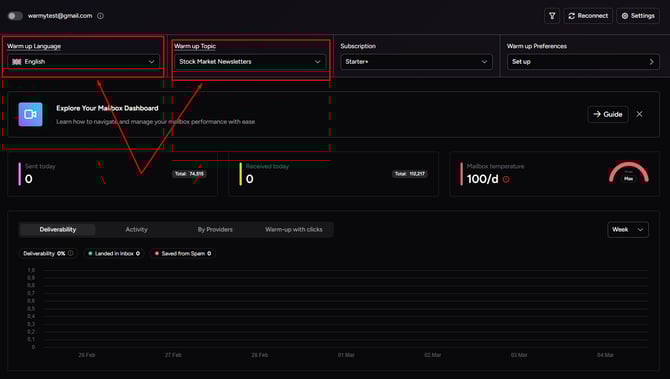
Most subscription plans allow you to choose the **language and topic** of warm-up emails.
This is useful if you are targeting a specific market or industry.
For example, you can warm up using content relevant to your niche and region, which helps align your reputation with your real campaigns.
---
#### 📊 Dashboard – Your Deliverability Command Center
The **Dashboard** gives you a complete overview of your setup in one place:
- Domain-level performance
- Domain health metrics
- Assigned templates
- Warm-up activity
- DNS record status (SPF, DKIM, DMARC, MX, A, rDNS)
- Google Postmaster data
- Overall reputation trends
Everything is visible in a single control center.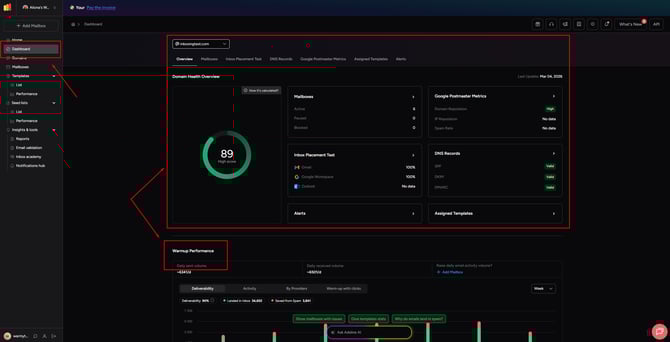
---
#### 🌐 Domains Tab – Domain Insights & Reports
Inside the **Domains** section, you can:
- View detailed domain metrics
- Monitor domain health
- Track reputation trends
- Download a **Domain Report**
- Review Google Postmaster integration data
This helps you understand how mailbox providers evaluate your domain.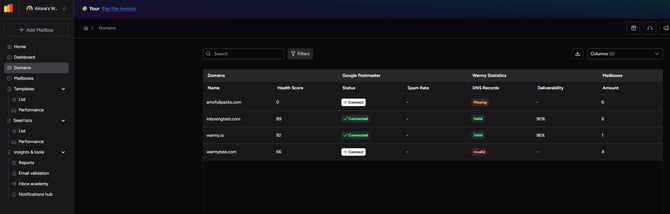
---
#### 📬 Mailboxes Tab – Advanced Mailbox Control
The **Mailboxes** section allows you to manage each mailbox individually.
Here you can:
- View detailed mailbox-level metrics and adjust warm up preferences
- Configure warm-up limits
- Select topics and templates
- Customize “Send From” name
- Run Inbox Placement Tests
- Create mailbox groups
- Monitor performance over time
This is where you fine-tune your warm-up strategy.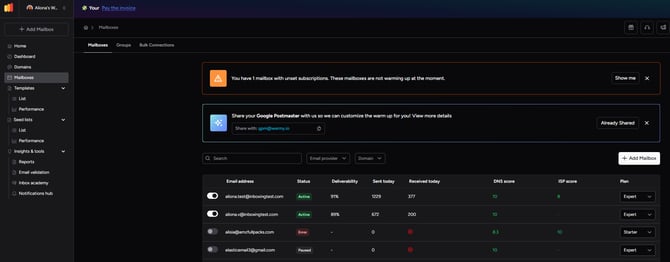
---
#### ✉️ Template Warm-Up – Improve Template Deliverability
Warmy allows you to add your **own templates** into the warm-up process.
The system checks your template for:
- Subject length
- Word count
- Reading time
- Number of links
- Question count
- Spam-trigger words
You can add both **Plain Text** and **HTML** templates and track their performance inside the Templates tab.
This ensures your real campaigns are reputation-ready before launch.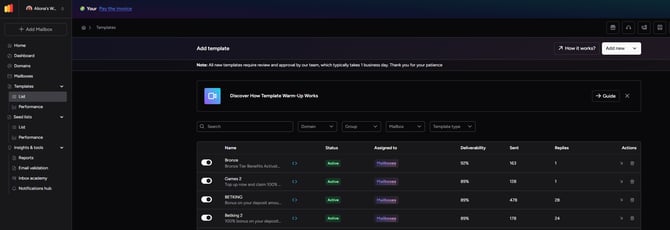
---
#### 📈 Deliverability & Inbox Placement Test
Warmy includes an **Inbox Placement Test**, which sends test emails to multiple providers to determine:
- Inbox placement
- Spam placement
- Overall deliverability performance
This helps you identify issues before launching large campaigns.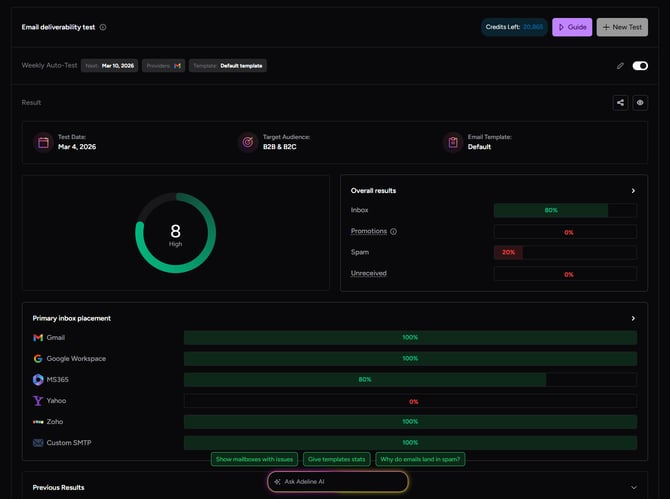
---
#### 🛠 DNS Monitoring & Security
Warmy checks critical DNS records that impact deliverability and security:
- SPF
- DKIM
- DMARC
- MX
- A Record
- rDNS
Proper DNS setup is essential for inbox placement, and Warmy keeps everything visible and easy to monitor.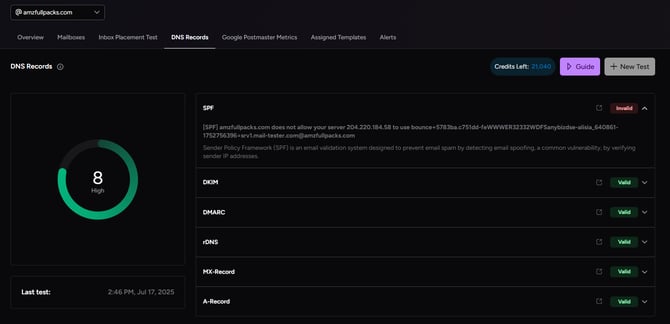
---
#### 🤝 Agency & Access Management
If you want someone else to manage mailboxes, you can invite them to your Workspace.
This allows colleagues or partners to monitor and manage warm-up without sharing credentials. Access is controlled and secure.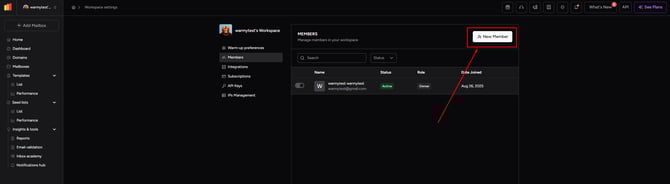
---
#### 🤖 Meet Adeline AI – Your Deliverability Assistant
Warmy created **Adeline AI**, your built-in intelligent assistant.
Adeline analyzes:
- Your warm-up performance
- Warm-up activity
- Deliverability metrics
- Domain and mailbox health
And not only warm-up — Adeline can also guide you with:
- Campaign setup advice
- Deliverability troubleshooting
- Performance optimization tips
- General platform guidance
Based on your real account data, Adeline provides actionable recommendations to improve inbox placement, optimize campaigns, and strengthen your reputation.
Instead of guessing what to fix, you get data-driven guidance instantly.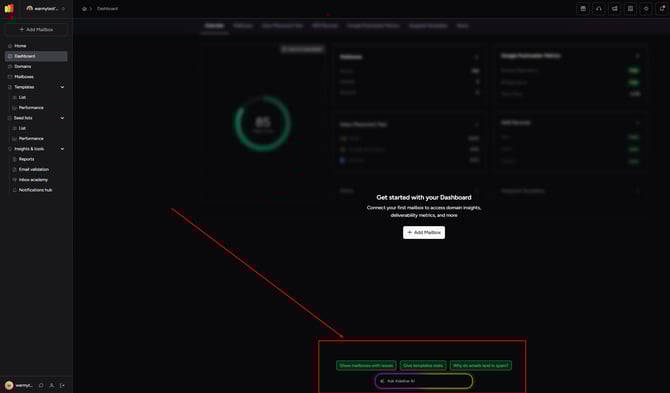
---
#### 🔎 Insights & Tools
Warmy also includes an additional section called **Insights & Tools**, where you can access advanced features for deeper analysis, monitoring, and optimization.
This section provides extra capabilities to enhance your deliverability strategy and give you more control over performance. We always recommend visiting the Inbox Academy tab as well to learn more about emailing!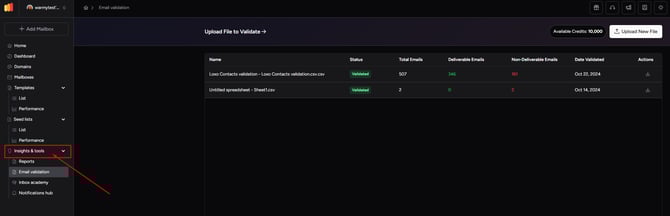
---
#### Why Use Warmy?
With Warmy, you get:
- Full automation
- Real-time monitoring
- Reputation protection
- Advanced testing
- Smart template optimization
- Team collaboration tools
All designed to help your emails consistently land in the Inbox — not Spam!
#### [Need help? **Schedule a call with us 👨🏻💻**](https://www.warmy.io/book-a-demo)
- [Connection Guide](https://support.warmy.io/knowledge/connection-guide?hsLang=en)
- [General questions](https://support.warmy.io/knowledge/general-questions?hsLang=en)
- [Technical questions](https://support.warmy.io/knowledge/technical-questions?hsLang=en#main-content)
- [SPF and DKIM Configuration](https://support.warmy.io/knowledge/technical-questions?hsLang=en#spf-and-dkim-configuration)
- [Subscription](https://support.warmy.io/knowledge/subscription?hsLang=en)
- [Collaborate](https://support.warmy.io/knowledge/collaborate?hsLang=en)
- [Features](https://support.warmy.io/knowledge/features?hsLang=en)
- [Troubleshooting](https://support.warmy.io/knowledge/troubleshooting?hsLang=en#main-content)
- [SMTP Errors](https://support.warmy.io/knowledge/troubleshooting?hsLang=en#smtp-errors)
- [Service-related issues](https://support.warmy.io/knowledge/troubleshooting?hsLang=en#service-related-issues)
- [Integrations](https://support.warmy.io/knowledge/integrations?hsLang=en#main-content)
- [Seed List Automations](https://support.warmy.io/knowledge/integrations?hsLang=en#seed-list-automations)
[](https://www.warmy.io/)
warmy.io Help Center
Copyright © 2026, AnyBiz LTD