


The connector only reads your data. It never changes anything in your account.
Before you begin
- An active Warmy account. No account yet? Sign up at warmy.io.
- A Claude account that supports custom connectors.
Warmy isn't in Claude's connector directory yet, so you add it by its address. The address is the same for every customer:
https://mcp.warmy.io/mcp
How to add the connector
- Open the connectors page
In Claude, go to Settings → Customize → Connectors. Select Add, then Add custom connector.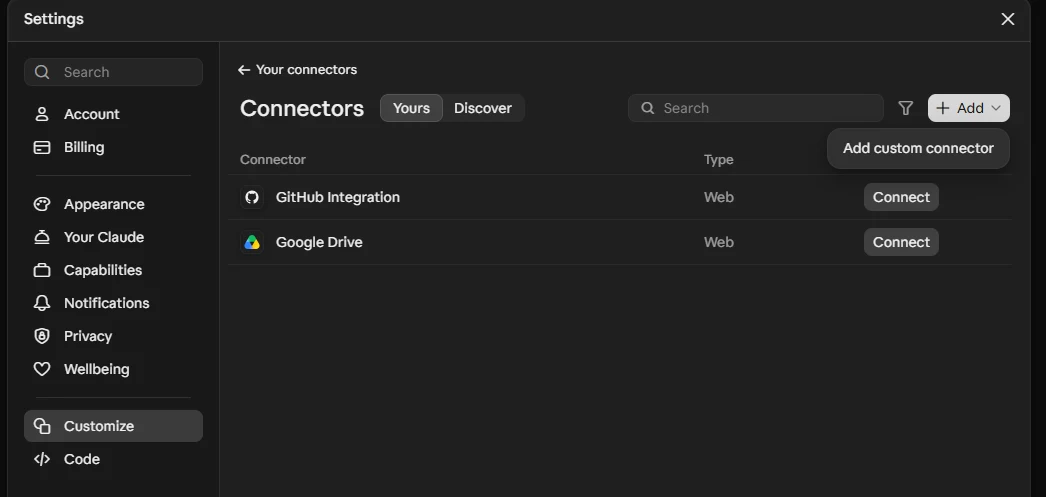
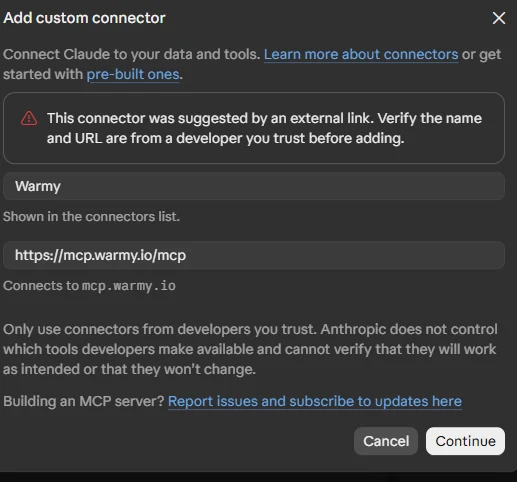
- Enter the name and address
Type Warmy as the name, paste the address and select Continue.If the form opened from a link, for example from the Warmy app, the fields are already filled in. Just check that the address is exactly https://mcp.warmy.io/mcp.
- Keep the detected sign-in settings
Claude selects Sign in now and Register automatically for you. Leave them as they are: you don't need a client ID, a client secret or headers. Select Add.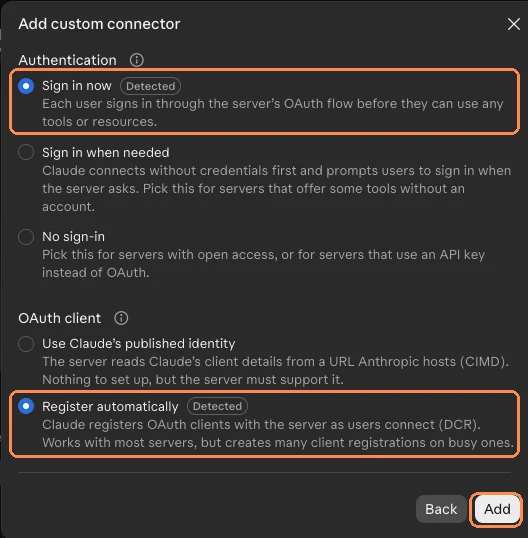
- Connect and sign in
Select Warmy in your connectors list, then Connect. Sign in on Warmy's own page with your usual email and password, then approve access. - Ask your first question
Start a new chat and ask: "List my Warmy mailboxes." Your real mailboxes should come back.If Claude doesn't use Warmy on its own, start with "Using Warmy, …". After a few uses it usually picks Warmy up by itself.
What you can ask
Name the domain, mailbox or time period you mean. Narrow questions get faster, more accurate answers.
- Which of my mailboxes have warm-up alerts right now?
- Are SPF, DKIM and DMARC set up correctly for company.com?
- Show me inbox placement for my main sending domain over the last week.
- Summarize my last deliverability check and tell me what to fix first.
You can ask in your own language.
Choose how Claude uses each tool
Go to Settings → Customize → Connectors → Warmy → Tool permissions and set each tool to:
- Always allow: Claude uses the tool without asking.
- Needs approval: Claude asks you before each use.
- Blocked: Claude can't use the tool.
What it can and can't do
- It reads your mailboxes, domains, deliverability checks, email templates, warm-up alerts and statistics, and reports.
- It doesn't change anything. Managing mailboxes, editing domains, warm-up settings and sending email stay in the Warmy app.
- It sees only what your Warmy permissions allow, and has no access to your API tokens.
Which workspace Claude reads
Claude reads the workspace selected in your Warmy account. If you switch workspaces, start a new chat. To check, ask: "Which Warmy workspace are you reading?"
Privacy
You sign in on Warmy's own page, so Claude never receives your Warmy password.
Disconnect Warmy
Go to Settings → Customize → Connectors → Warmy and select Disconnect. Access ends immediately, and you can reconnect any time.
Using Warmy with a team? Let them know Warmy is available in Claude.